 Cuis Smalltalk
Additional packages for Cuis
Where optional functionality for Cuis lives, how to load it, and how to list your own package.
The Cuis base image includes only kernel functionality, very basic libraries, and development tools. Everything else comes in Packages that you load when you need them.
Don’t forget to check the Packages section when searching for useful packages for Cuis!
Official packages
The main Cuis GitHub repository includes a Packages folder with basic libraries and system extensions that are used by many other packages and applications, and that are maintained and kept up to date in sync with the base Cuis image.
The Cuis Smalltalk GitHub organization hosts additional repositories with community developed code. Repos in the Cuis Smalltalk organization are meant for wide use. Explore them!
Other packages
Packages outside the Cuis Smalltalk organization live in the repos of their authors.
Loading a package
A package is loaded with Feature require: and its name, which is the name of its .pck.st file.
You can load the packages in the Packages folder like this:
Feature require: 'Sound'.
Feature require: 'WebClient'.
Feature require: 'JSON'.
A package from another repo needs to be on your computer first. From the folder that contains your Cuis folder, clone its repo, or download it as a ZIP and unzip it there:
git clone https://github.com/Cuis-Smalltalk/Cuis-Smalltalk-Regex
Both folders end up side by side:
MyProject/
├── Cuis-Smalltalk-Dev/
└── Cuis-Smalltalk-Regex/
    └── Regex-Core.pck.st
And you load it the same way:
Feature require: 'Regex-Core'.
Feature require: looks for packages in the Packages folder of Cuis, and in every folder inside the one that contains Cuis, at any depth. It also loads the packages that a package requires, looking for them in the same places. If they live in other repos, clone those too. The directory structure of Cuis describes these folders.
Want the official packages at hand? Run clonePackageRepos.sh from your Cuis folder: it clones the package repos of the Cuis Smalltalk organization next to it.
You can also install a .pck.st file from any folder with the FileList. See Managing your code in Cuis.
Registering a package
The Packages page lists the GitHub repositories with the topic cuis-smalltalk-package. So you only need to add the topic to your repository to register it. Not on GitHub yet? See Using Git and GitHub to host and manage Cuis code.
-
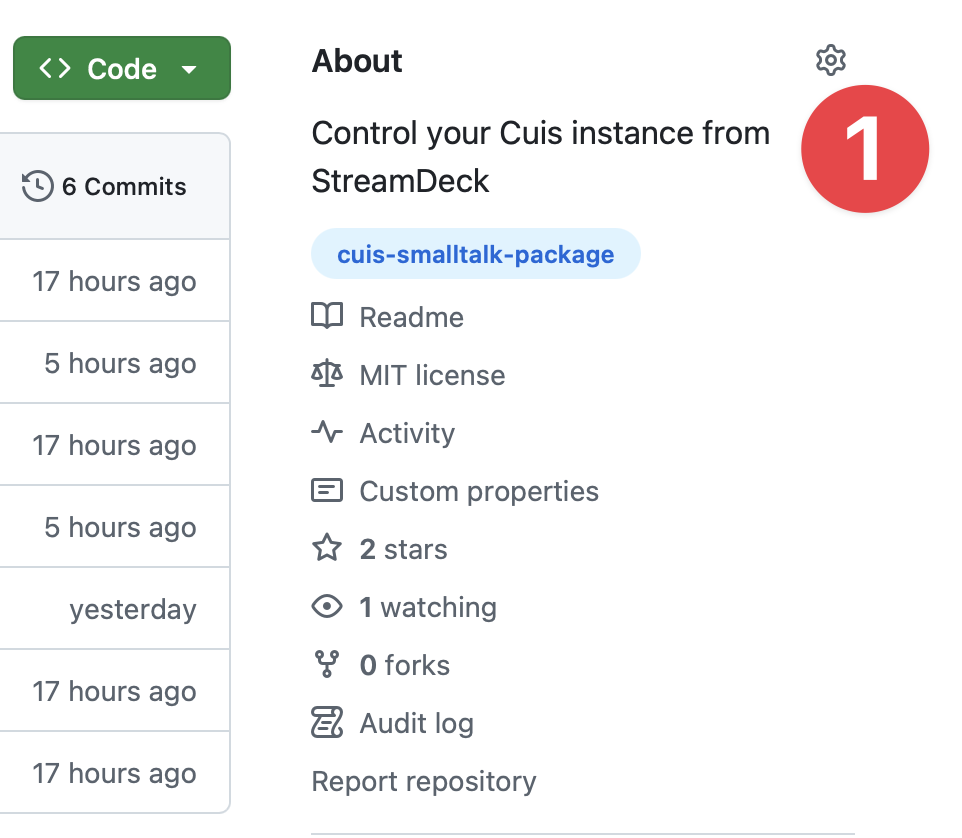
On the page of your repository on GitHub, click the gear next to About.
-
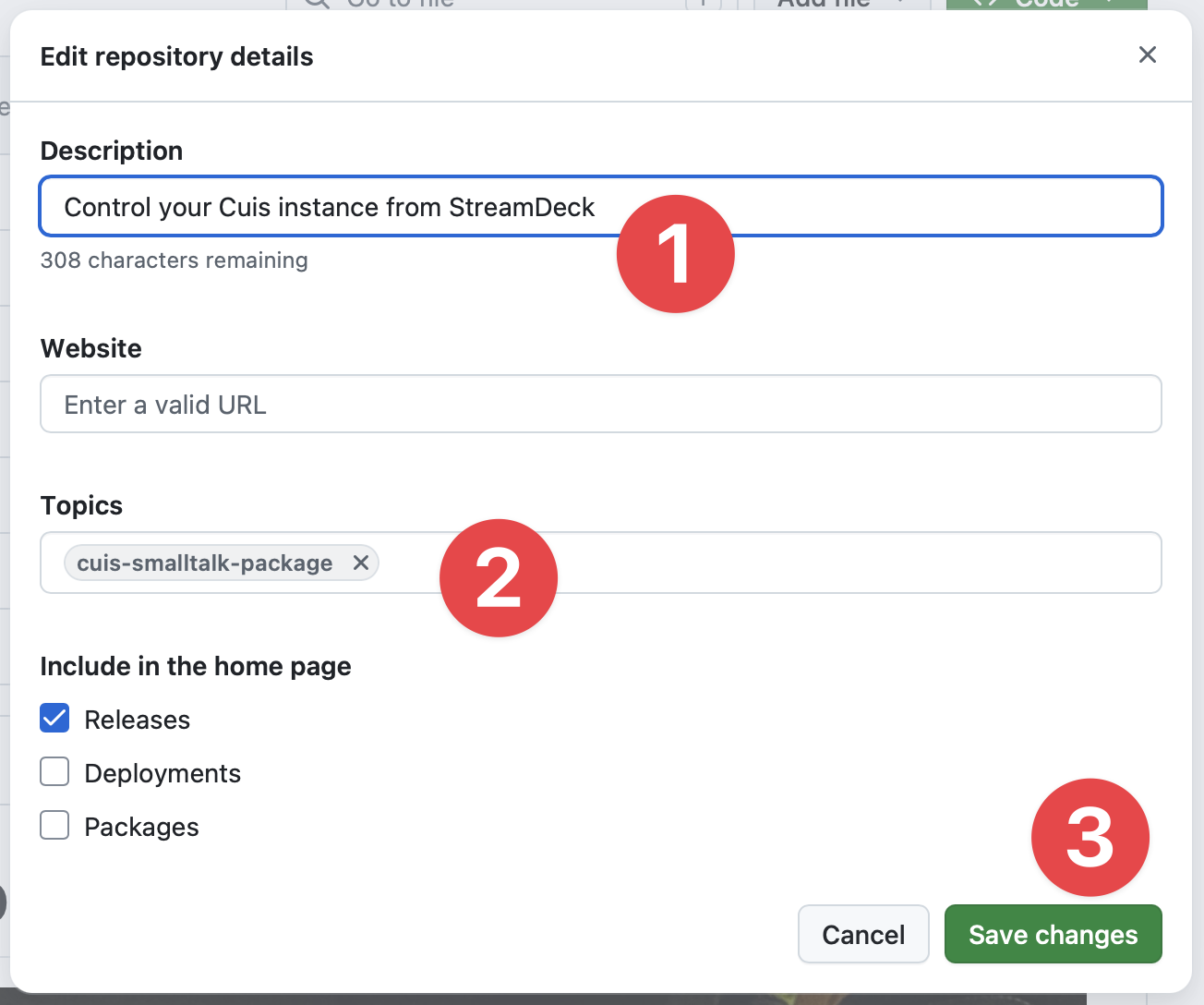
In Edit repository details:
- Write a Description. It’s what people will read on the card of your package.
- In Topics, add
cuis-smalltalk-package. - Click Save changes.
Your package will appear with the name of its repository, without Cuis-Smalltalk- or Cuis- at the start: Cuis-Smalltalk-Regex appears as Regex.
Repositories with the same package name, ignoring case, are one package, with a single card that lists them all: Cuis-Smalltalk-Regex and regex both show up as Regex. That’s how a fork appears next to its original, since it keeps the same name.
Want to take your package off the list? Just remove the topic.
The list is updated every day at around , and each time the site is updated.